
Reducing Electrical Noise and USB Disconnections
Improve USB connection reliability by reducing electromagnetic interference from power supplies, motors, spindles, VFDs, and other CNC equipment.
Why USB Disconnections Occur
A CNC control system contains several possible sources of electromagnetic interference, including switching power supplies, stepper motors, spindles, Variable Frequency Drives (VFDs), plasma cutters, laser power supplies, and coolant pumps. Electrical noise from this equipment can reach the computer or the Rabbit Board through power wiring, signal cables, grounding paths, or the USB connection.
When interference is strong enough, the USB serial connection may become unstable or disconnect while the machine is operating. Correct grounding, shielding, filtering, and cable routing are essential for reliable communication.
Use a High-Quality Shielded USB Cable
Use a high-quality USB A to USB B cable with electromagnetic shielding and ferrite cores at both ends. Keep the cable length at or below 1.8 meters and avoid running it next to mains wiring, motor cables, spindle cables, relays, or VFD wiring.
Connect the Rabbit Board directly to the computer whenever possible. Avoid low-quality extension cables and unpowered USB hubs. For permanent installations, a good-quality panel-mount USB connection can protect the controller connector from mechanical stress.
Install the Electronics in a Grounded Metal Enclosure
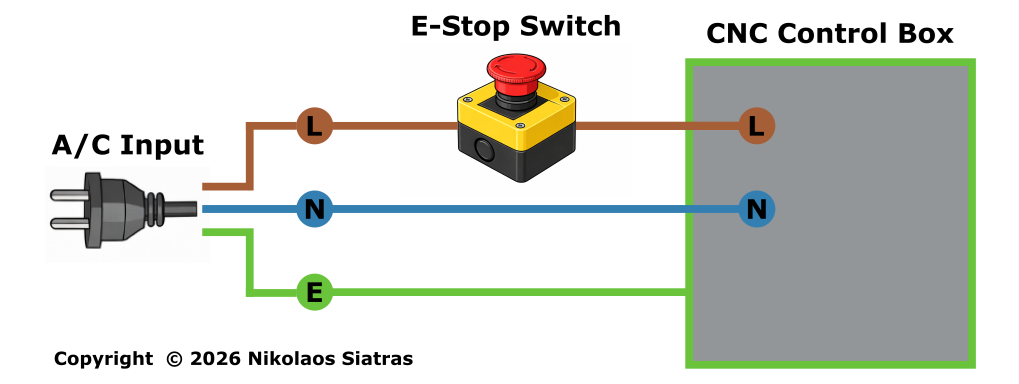
Install the Rabbit Board, power supplies, motor drivers, and related control electronics inside a metal enclosure that is firmly connected to protective earth. The enclosure provides electromagnetic shielding only when it has a reliable electrical connection to PE.
Mount power supplies and filters so their metal bodies have the required connection to the grounded enclosure. Follow the equipment manufacturer's grounding instructions and use a central grounding arrangement to reduce ground loops.
Install EMI/RFI Filters at Noise Sources
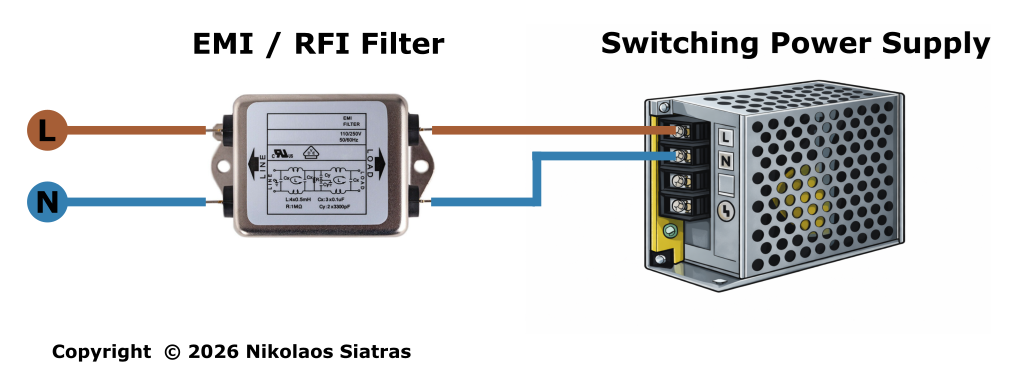
Install a suitable EMI/RFI mains filter at the AC input of equipment that can conduct interference into the electrical system. Typical sources include switching power supplies, transformers, VFDs, spindle power circuits, plasma cutters, laser power supplies, and coolant pump power supplies.
Place each filter as close as practical to the AC input of the device it protects. A VFD and the motor power supply should use separate filters when required. Filter selection, mains wiring, protective-earth connections, and work inside mains-powered equipment must be completed by a licensed electrician.
Separate Power and Signal Wiring
Keep mains cables, motor power cables, VFD output cables, and spindle wiring separated from USB, STEP/DIR, limit switch, and probe cables. When cables must cross, crossing them at approximately 90 degrees helps reduce coupling compared with running them in parallel.
Use twisted-pair wiring for STEP/DIR signals and shielded signal cable where appropriate. VFD-to-spindle wiring should use the cable type and shielding method specified by the VFD and spindle manufacturers. Keep VFDs, plasma cutters, and other strong interference sources as far as practical from the computer and low-voltage controller electronics.
USB Disconnection Checklist
If USB disconnections continue, test the system step by step:
- Replace the USB cable with a short, shielded cable with ferrites.
- Connect directly to another USB port on the computer.
- Confirm that the metal control enclosure and all protective-earth connections are secure.
- Check that each major AC-powered noise source has an appropriate EMI/RFI filter.
- Temporarily test with the spindle, VFD, pump, or other suspected noise source disabled to identify when the disconnection occurs.
- Inspect cable routing and increase the distance between USB or signal wiring and power cables.
Do not bypass protective earth or safety devices while troubleshooting. If the problem involves mains wiring, a VFD, or other high-voltage equipment, stop and ask a licensed electrician to inspect the installation.