
Configuring Rabbit GRBL Settings
Configure steps per unit, maximum rate, acceleration, and maximum travel for the X, Y, Z, and A axes of the Rabbit Board 4-Axis.
The Four Main Axis Setting Groups
The Rabbit Board 4-Axis operates with Rabbit GRBL, the SourceRabbit GRBL-compatible firmware for ESP32-based motion controllers. Complete documentation for Rabbit GRBL settings, commands, communication, and advanced features is available in the Rabbit GRBL Wiki.
Rabbit GRBL stores separate motion settings for the X, Y, Z, and A axes. The four fundamental groups define how commanded movement is converted into motor steps and how fast and how far each axis may move.
| Axis | Steps per Unit | Maximum Rate | Acceleration | Maximum Travel |
|---|---|---|---|---|
| X | $100 | $110 | $120 | $130 |
| Y | $101 | $111 | $121 | $131 |
| Z | $102 | $112 | $122 | $132 |
| A | $103 | $113 | $123 | $133 |
Configure these values conservatively and test one axis at a time. Incorrect values can cause inaccurate movement, lost steps, or travel beyond the safe machine area.
Change Settings Easily from Focus
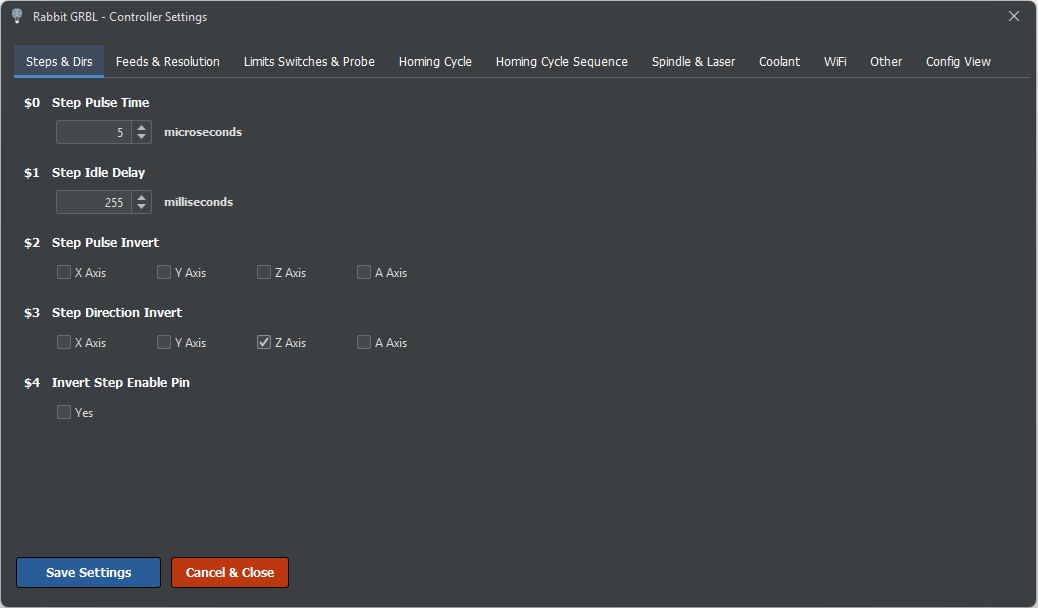
Rabbit GRBL settings can be viewed and changed easily from the GRBL Settings window in SourceRabbit Focus. Connect Focus to the Rabbit Board, then open:
System > GRBL Settings
Focus reads the settings from the controller and presents them in a dedicated window, so you do not need to remember every setting number or enter each command manually. Edit the required value and use the available action in the window to write the change to Rabbit GRBL.
Keep the machine idle while changing settings. Record the original values before making changes, update one setting group at a time, and verify the result with a controlled movement. Rabbit GRBL stores the new values in non-volatile memory, so they remain active after a reboot.
Steps per Unit: $100 to $103
The steps-per-unit settings define how many step pulses Rabbit GRBL must generate to move an axis by one machine unit. For linear axes, the unit is normally one millimeter.
- $100: X-axis steps/mm
- $101: Y-axis steps/mm
- $102: Z-axis steps/mm
- $103: A-axis steps per configured unit
For a screw-driven linear axis, the theoretical value is:
Steps per mm = (Motor steps per revolution x Driver microsteps) / Screw lead in mm per revolutionFor a belt-driven axis, use the linear distance travelled by the belt per motor revolution. If the A axis is configured as a rotary axis, calculate and calibrate it using the angular units expected by the active machine profile.
Calibrate the Steps Setting
A theoretical calculation is the correct starting point, but the final value should be verified by measurement. Command a known movement, measure the actual distance travelled, and calculate the corrected setting:
New setting = Current setting x Commanded distance / Measured distanceFor example, if the axis is commanded to move 100mm but moves 99.5mm, multiply the current steps/mm value by 100 and divide by 99.5. Enter the result, repeat the movement, and verify it again.
Use a reliable measuring instrument and approach the measurement from the same direction to reduce backlash influence. If the motor driver microstep setting, pulley, gearbox, or leadscrew changes, calculate and calibrate the steps setting again.
Maximum Rate: $110 to $113
The maximum-rate settings define the highest commanded speed allowed for each axis:
- $110: X-axis maximum rate
- $111: Y-axis maximum rate
- $112: Z-axis maximum rate
- $113: A-axis maximum rate
Linear-axis values are normally expressed in mm/min. Start with a conservative speed and increase it gradually while testing the complete travel of the axis. If the motor stalls, loses steps, vibrates excessively, or the driver reports a fault, reduce the value.
The safe maximum depends on motor torque, supply voltage, driver configuration, moving mass, screw or belt mechanics, and the required reliability margin. Do not use the highest speed reached in a short unloaded test as the normal machine limit.
Acceleration: $120 to $123
The acceleration settings control how quickly each axis increases or decreases its speed:
- $120: X-axis acceleration
- $121: Y-axis acceleration
- $122: Z-axis acceleration
- $123: A-axis acceleration
Linear-axis acceleration is normally expressed in mm/sec^2. Values that are too high can cause lost steps, mechanical shock, vibration, or driver faults. Values that are unnecessarily low make the machine slow to respond and increase job time.
Begin with conservative values and test repeated direction changes as well as longer moves. Heavy gantries and vertical Z axes usually require more conservative acceleration than light axes.
Maximum Travel: $130 to $133
The maximum-travel settings describe the usable movement range of each axis:
- $130: X-axis maximum travel
- $131: Y-axis maximum travel
- $132: Z-axis maximum travel
- $133: A-axis maximum travel
Measure the safe usable travel of the machine, not only the theoretical mechanical length. Leave clearance before hard stops, fixtures, cable limits, and any area where the axis can bind or collide.
These values are essential when soft limits are enabled with $20. Soft-limit protection is reliable only after homing has established the machine position and the maximum-travel values match the real machine.
Recommended Setup and Verification Order
- Save or record the current settings before making changes.
- Configure and calibrate $100-$103 first.
- Set conservative acceleration values with $120-$123.
- Increase maximum rates $110-$113 gradually while testing for reliable motion.
- Measure and enter the safe maximum travel with $130-$133.
- Test short and long movements on one axis at a time before running a G-code job.
You can also view the current Rabbit GRBL settings by sending $$ in the console and change an individual value with a command such as $100=250.000. The Focus GRBL Settings window provides a more convenient interface for the same controller settings.