
Semi-Automatic Tool Change
Use Focus with a tool setter or touch plate to measure tool length automatically during semi-automatic tool changes.
What Semi-Automatic Tool Change Does
Tool changes without automatic tool length measurement can be slow and error-prone on CNC machines.
Focus supports semi-automatic tool changes with automatic tool length measurement. When your GCode contains an M06 tool change command, Focus can pause the job, guide the tool change process, measure the new tool length, and then continue the job using the updated tool length reference.
This workflow is useful when a CNC job uses more than one tool and each tool must be measured before machining continues.
How It Works
A tool setter or a simple touch plate is connected to the CNC controller and used as a reference surface.
When the GCode cycle reaches a tool change command, Focus moves the machine to the configured tool setter position. After the user changes the tool, Focus probes the tool against the tool setter, calculates the new tool length, and returns to the machining workflow.
This process is repeated for every subsequent M06 command in the running GCode file.
Wiring the Tool Setter
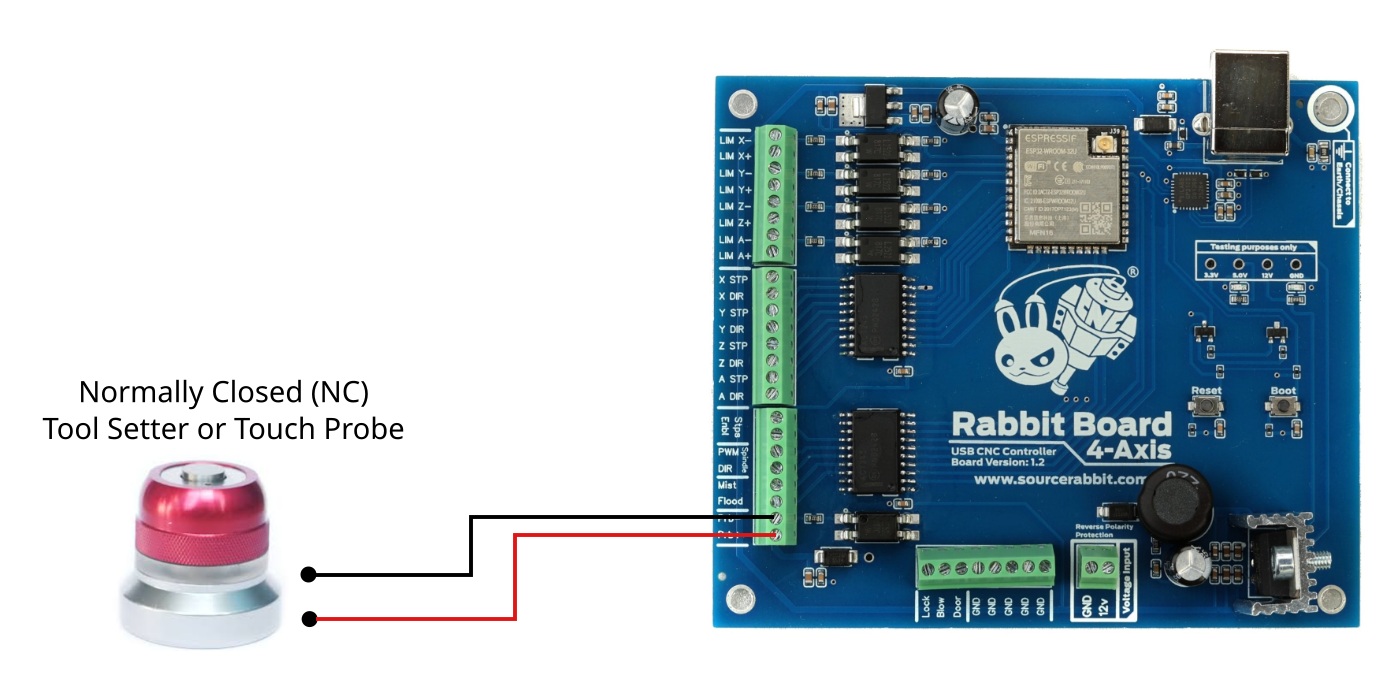
The tool setter must be connected to the controller's probe input.
On Rabbit Board 4-Axis, the tool setter is connected to the probe pins. These probe pins are opto-isolated, which helps protect the controller from external electrical noise.
A tool setter can usually be wired as either:
- NC - Normally Closed
- NO - Normally Open
For safer behavior, NC wiring is recommended.
Enable Semi-Automatic Tool Change in Focus
After connecting the tool setter to the controller, enable the feature in Focus.
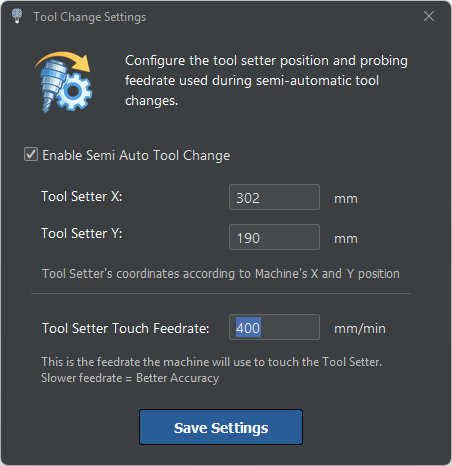
From the main menu, open Machine > Tool Change Settings.
Then enable Enable Semi Auto Tool Change.
In the same settings window, configure the tool setter position and the related probing settings according to your machine setup.
Before Running a Job
Before running a GCode file that uses tool changes, check that:
- The tool setter is connected correctly.
- The probe input works reliably.
- The tool setter position is configured in Focus.
- The spindle can move to the tool setter position safely.
- The GCode file uses M06 commands for tool changes.
- The machine has enough clearance for tool changes and probing moves.
This step is important because automatic tool length measurement depends on both correct wiring and correct machine setup.
During a Tool Change
When Focus reaches an M06 command, it starts the semi-automatic tool change workflow.
The user changes the tool manually, and Focus performs the tool length measurement using the configured tool setter. After measurement, Focus updates the tool length reference and continues the job.
This makes multi-tool CNC jobs much easier to run because the user does not need to manually calculate or enter the new tool length after every tool change.
If Tool Length Measurement Does Not Work
If the tool length measurement does not work as expected, check the following:
- The tool setter wiring is correct.
- The probe input changes state when the tool touches the setter.
- The controller firmware supports probing.
- The correct probe input is used.
- The tool setter position is reachable by the machine.
- The probing direction and probing distance are configured correctly.
- No other controller alarm or machine state is blocking probing.
For safety, always test the tool setter slowly before using it in a real CNC job.